Managing WIT Dependencies
Every component project depends on WIT interface definitions: the WASI and wasmCloud packages your component imports and exports, and any custom interfaces your components use to talk to each other. This page covers how those dependencies work and how to manage them with wash: where packages come from, how to lay out a project, how to point a dependency at a local directory, and how to publish interfaces of your own.
WIT packages are OCI artifacts
A WIT package is a set of interface definitions with a namespace and a name, like wasi:http or wasmcloud:messaging. Packages are encoded as WebAssembly binaries and distributed through OCI registries, the same infrastructure that stores your container images and components. There is no separate package manager infrastructure to stand up: if you have a registry, you can host WIT packages.
wasmCloud's first-party packages are published to ghcr.io/wasmcloud/interfaces/<name>:<version>, and the WASI packages resolve from the ecosystem's default registry mappings. When you run a fetch, wash resolves each package your world references and downloads it from the appropriate registry. See Registries for the full publishing details.
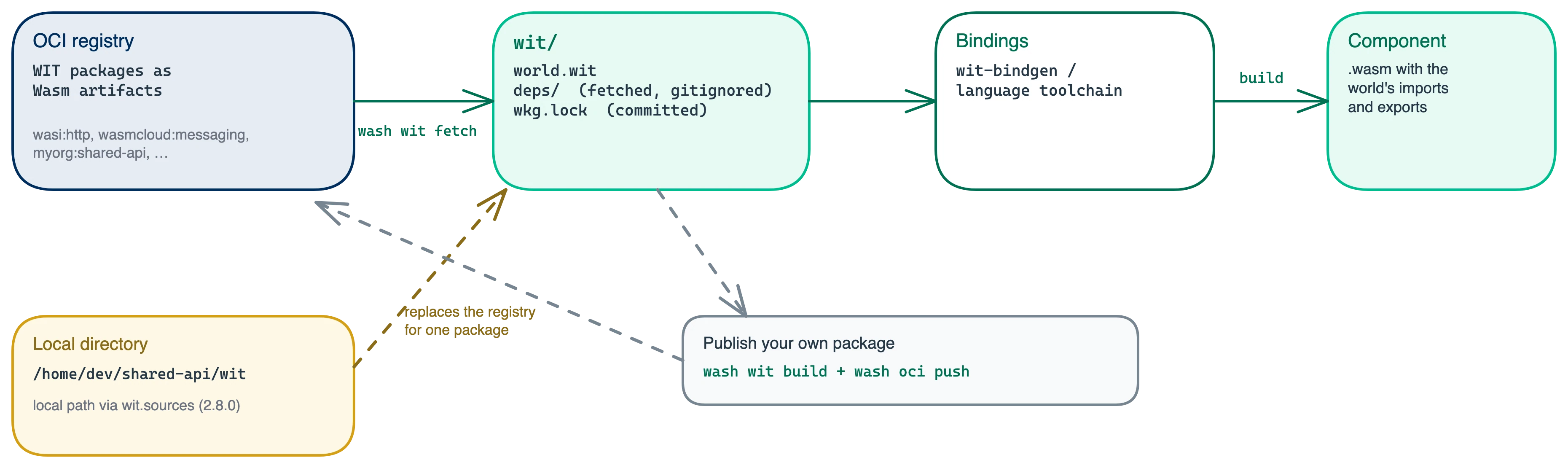
The tooling is built into wash
wash bundles the wkg WebAssembly package manager as a library, so there is no separate tool to install. The wash wit subcommands cover the lifecycle:
| Command | What it does |
|---|---|
wash wit fetch | Resolves the imports in wit/world.wit and downloads them to wit/deps/, writing wkg.lock |
wash wit add wasi:keyvalue/store | Adds an interface import to your world, validating the reference first (a bare package name lists its interfaces) |
wash wit remove wasi:keyvalue | Removes an interface or package from the world, drops it from wit/deps/, and re-fetches |
wash wit update | Updates dependencies to the latest compatible versions and reports what moved |
wash wit build | Builds your WIT package into a distributable Wasm binary |
wash wit clean | Removes fetched dependencies |
wash build runs the fetch automatically, so day to day you rarely run these by hand.
Two conventions to follow in every project:
- Commit
wkg.lock. It pins the exact versions your build resolved, making builds reproducible. - Add
wit/deps/to.gitignore. These are fetched artifacts, likenode_modulesortarget.
The wasi, wasmcloud, wrpc, and ba namespaces resolve automatically with no configuration. For other namespaces, map the package to a registry with the wit.sources project configuration; wit.registries supplies credentials when a registry is private.
wkgIf you already use wkg directly, wash interoperates: both share the same underlying crate, honor the same configuration files, and produce the same wkg.lock. You do not need wkg installed to use wasmCloud, and mixing the two in one project is safe.
Project layout: one top-level wit/ directory
Keep all of a project's WIT in a single wit/ directory at the repository root, even when the project builds several components. This is the convention wasmCloud recommends:
my-project/
├── wit/
│   ├── world.wit        # Worlds for every component in the project
│   └── deps/            # Fetched dependencies (gitignored)
├── api/                 # Component: HTTP API
│   ├── src/
│   ├── wkg.lock         # Committed
│   └── .wash/
│       └── config.yaml  # wit.wit_dir: ../wit
└── worker/              # Component: background worker
    ├── src/
    ├── wkg.lock         # Committed
    └── .wash/
        └── config.yaml  # wit.wit_dir: ../wit
Each component is its own wash project, and each points its wit.wit_dir at the shared top-level directory. Interface definitions live in one place with no duplication between components: when the API imports what the worker exports, that interface is defined once and both worlds reference it. Define one world per component and select it in each component's bindings step (wit_bindgen::generate!(world: ...) in Rust, -wit-world with TinyGo).
The tradeoff to know about: a Rust crate published to crates.io only packages its own directory, so a published library crate is compiled from source on its consumers' machines, so its wit_bindgen::generate! invocation cannot rely on WIT that lives above the crate in the repository. For publishable library crates, either keep that crate's WIT inside the crate directory or commit the generated bindings instead of generating at build time. This affects published libraries, not applications.
Local file references
Dependencies do not have to come from a registry. The wit.sources map in project configuration overrides where a package resolves from, and it accepts absolute local paths as of wasmCloud 2.8.0 (alongside HTTP, Git, and OCI references):
wit:
  sources:
    "myorg:shared-api": "/home/dev/shared-api/wit"
With this override, wash wit fetch reads myorg:shared-api from the local directory instead of a registry. Local references are the right tool whenever the interface and its consumers are developed together:
- Iterating on an interface and a component side by side. Change the WIT, re-fetch, rebuild. No publish step in the loop.
- Multiple repositories sharing an unpublished interface. Point each consumer at a checkout of the interface repository until the package is published.
- Testing interface changes before release. Override a published package with a local working copy to validate consumers against the next version.
The override changes only where the package comes from. The world syntax, the fetch workflow, and the lock file all work the same, so moving from a local path to a published package later is a one-line change.
Publishing your own interfaces
When an interface needs to be shared beyond a single repository, publish it as a package.
wash wit build encodes your WIT package as a Wasm binary named <package>-<version>.wasm:
wash wit buildwash oci push publishes it to any OCI registry you can write to (see Registries for authentication).
wash oci push ghcr.io/myorg/shared-api:0.1.0 ./shared-api-0.1.0.wasmPush to a repository path ending in <namespace>/<package> (here myorg/shared-api), with the tag matching the package's declared version. Consumers then resolve it with a wit.sources entry mapping the package to the registry path, plus a wit.registries entry only if credentials are needed.
Version WIT packages like an API: publish a new version for breaking changes and keep old versions available, since deployed components reference the version they were built against.
Keep reading
- Interfaces — WIT and the interfaces wasmCloud provides.
wash witcommand reference — full flags for each subcommand.- Configuration:
witoptions — registries, sources, and directory settings. - Registries — pushing and pulling OCI artifacts, including WIT packages.
wasm-pkg-tools(wkg) — the underlying package manager, including its own configuration reference.- Component Model documentation — the WIT language itself.